Hooked up with Facebook

I’ve just hooked this blog up with Facebook, and incidentally, unhooked my technical blog (https://cyberherbalist.wordpress.com).  The unhooking of my technical blog is primarily because I’m pretty sure it is waaaaay too technical for the venue.  How many people want to read computer code on Facebook?  I’m sure the number is not high.

This blog is my personal web log, and it is more appropriate for Facebook anyway.

Posted in Miscellaneous | Leave a comment

Interesting WP7 ListBox Behavior

I just finished a knock-down drag-out battle against my own code.  And I won.  Finally. 

Quite frankly, this was completely unexpected behavior, and I wasn’t sure if it was native behavior or introduced by something I did, or something that the Non-Linear Navigation Service provided by Yochay Kiriaty caused, but it turns out to be native behavior.  I’ll explain the problem, then show how I overcame it.

Non-Linear Navigation Service

But first of all I want to emit a word or two in praise of Yochay Kiriaty and the Windows Phone Developer team for their work creating the Non-Linear Navigation Service!  Hip hip hooray!  The Ham Radio Practice Exam app is complex enough to be getting into some serious loop navigation problems and I was starting to despair that I would have to interrupt development in order to fix the problem myself.  But then I happened upon NLNS, and my problem was solved!  I am most grateful, and this ought to demonstrate the dedication and attention to detail put forth by Microsoft’s Windows Phone Developement Team.  This is one classy bunch!

Navigation Using a List Box

Rather than trying to work inside my app, which in the relevant locations has a lot of code unnecessary to illustrate the problem, I’ll use  a bare-bones example.  Let’s start with the list box:

Basic List Box Xaml code

List Box XamlList Box with Selected Item

Here is its SelectionChanged handler:  

List Box Selection_Changed Event Handler

List Box Selection_Changed Event Handler

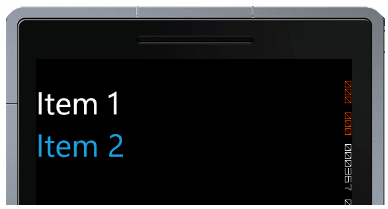
Page1.xaml is a simple page with nothing in particular on it. The interesting behavior is demonstrated by running the app.  Click on either of the two list box items, and you will be taken to Page1.  Everything very normal and boring.  But now click on the Back navigation button. You find yourself back on the MainPage looking at the List Box, as expected, but there’s a difference.  See the color of the List Item you clicked earlier?  It’s a blue color and if you click on it now, nothing happens.  If you click on the other List Item, you will be taken to Page1, and upon return to the MainPage this time the other List Item will be blue and unselectable. 

List Box with Selected Item

List Box with Selected Item

The reason for it being unselectable is because its state is already Selected.  Since you can’t select something that is already selected, it ignores your click!  That seems normal, but what doesn’t seem normal is that a simple GoBack from the navigated-to page leaves your list box item selected!  Is there a simple way to avoid this?  I don’t know, but I did figure out a workaround.

The Workaround

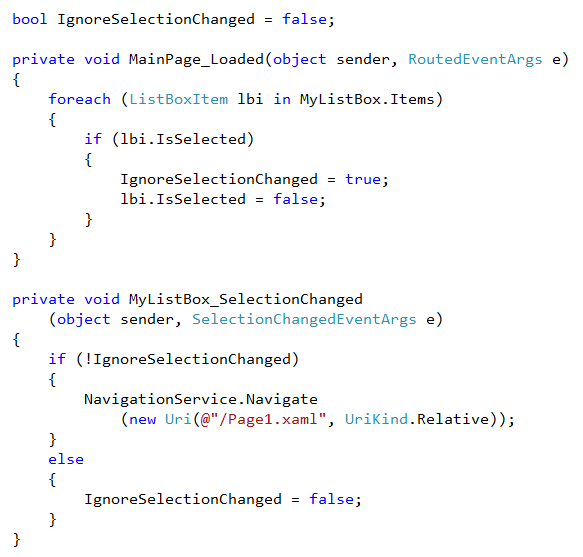
What I did to get around the problem was to place code in the Page_Loaded event that goes through each List Box Item checking to see if it is Selected, and if it is then it sets the IsSelected property to false.  Since doing this will cause the ListBox_SelectionChanged event to fire and undesired naviagation to Page1, I suppress this by temporarily setting a boolean to route around the navigation code. 
 
Here’s the complete code:
 
The Code Workaround

The Code Workaround

 
And so it is fixed.
 
Now, if there is some simpler thing I could have done perhaps someone could explain it!
 
Posted in Miscellaneous | 3 Comments

Tax Day

Well, that day has come and I finally buckled down and filed.  I use Turbo Tax, and as it has for several years, it enabled me to get this painful exercise over with the minimum of fuss. 

Now, while I don’t completely disapprove of taxes, I believe that a tax on income is just wrong.  I will not go into all the reasons I believe this, at least not in this post, but I would prefer a consumption tax.  Or, if that were not possible (and why not?), then there should be a very simple flat rate tax that applies to everyone.  And I mean everyone who earns a buck.  No deductions.

Posted in Miscellaneous | 1 Comment

Antoine Dufour

Like many software developers I like music and can even play an instrument (guitar, and not too well due to lack of practice).  Thus when I run into someone who can really pluck them strings and make great music I am happy.  My brother Mark can play great guitar, but as much as I have asked him to post a video of him playing some cool riff on YouTube, he just hasn’t gotten around to it.  But have you heard of Antoine Dufour?

Antoine is not only a guitarist, he also plays some other guitar-like stringed instruments.  Most people who play a guitar just play the strings, but not Mr. Dufour.  The guitar in his hands becomes a percussion instrument as well.  He is very good.  Here are two of my favorite Dufour videos:

.

.

Posted in Music | 1 Comment

I Start a Non-Tech Blog

I initially posted a non-technical, music-related piece here earlier today, but then I decided that I wanted this blog to remain on-message as far as technology is concerned, so that post is gone.  However, I will continue to want to post non-technical things, so I’ve started a new blog just for that.   I was about to say…

http://iwasabouttosay.wordpress.com

Now I’ve blogged in many places before, but my WordPress blogs are now my current outlets.  I will not be updating the old ones, and they may even disappear because nobody ever visits them anyway — least of all me!

So, on with the show.

PS – that blogpost I said was “gone”?  Well, it wasn’t deleted, it was merely moved to the new blog.

Posted in Miscellaneous | Leave a comment

BigInteger: Wow!

An interesting new construct in .NET 4 is the BigInteger.

You may recall that the max value of the following integer types are:

Int16.MaxValue = 32,767

Int32.MaxValue = 2,147,483,647

Int64.MaxValue = 9,223,372,036,854,775,807

Now, it won’t be often that you will need a larger integer type than Int64, but if it happens that you do need one, BigInteger will fill the bill! And how large can a BigInteger get? Thinking to blow an exception with the operation, I cubed Int64.MaxValue and did not exceed it with this result:

784,637,716,923,335,095,224,261,902,710,254,454,442,933,591,094,740,000,000

Wow. I then looked it up and found out that:

The BigInteger type is an immutable type that represents an arbitrarily large integer whose value in theory has no upper or lower bounds.

Apparently, you can make a BigInteger as arbitrarily large as you want, up until the point where you exceed the available memory of the machine and blow an OutOfMemoryException.

Interestingly, I found that the really long number I gave above is more than a octillion times as large as the number of inches to the farthest galaxy yet discovered (a mere 13 billion light-years away). Of course, if things continue as they appear to be going, we may yet need the BigInteger type to represent the size of the US national debt. Otherwise, I cannot imagine needing it for any purpose I expect to encounter.

But what fun!

Check out more about BigInteger HERE.

CAUTION:

But with the huge possibilities of BigInteger come some performance hits!  Doing computations with it costs considerably more CPU time than even Int64. 

Int32 i = Int32.MaxValue;

for (Int32 y = 0; y < i; y++) { }

for (BigInteger b = 0; b < i; b++) { }

The first for/next loop takes 6.95 seconds on my machine, but the second takes 209.44 seconds!  Wow again!  Best use BigInteger only where absolutely necessary or where only a few calculations are needed.

Posted in Miscellaneous | Leave a comment

Ham Radio Licensing — Practice Exams!

I may have mentioned in this space that I have been working on three new apps, practice exams for Amateur Radio licensing. Well, after getting the Fraction Calculator squared away I am getting back to work on them. There will be one app for each of the three license classes, Technician, General and Amateur Extra. Oh, yes, I have to say this is for the United States only, since each country has its own Ham Radio licensing requirements. The technology is the same, but the implementations in each country aren’t necessarily the same.

Progress is such that I should have the Technician exam done within two weeks. Since the three exams are highly similar, it will be a piece of cake to adapt the General and Amateur Extra apps to their own question pools. A good deal of the work for this set of apps was adapting the files of the question pools into Xml so I could easily use Linq to import them to each app. This is finally complete and from now on it will be mainly a question of presentation and exam generation. The question pools contain hundreds of questions, but a given Ham exam will only present 35 of them in the case of Technician and General, or 50 in the case of Amateur Extra (known more popularly as simply “Extra”). Question selection is a major part of this.

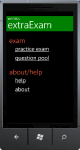
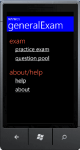
I do have the design of the Main screen of each practice exam complete. Here they are:

I am hoping to have all three in the Marketplace by 10 April 2011.  We’ll see how well I meet that deadline!

Let me add a preliminary demo video of the Technician practice exam app:

.

Posted in My Apps, Windows Phone 7 Apps | 1 Comment

The Trials of Trial Mode

I would have been done with Fraction Calculator sooner if not for the need to cram Trial Mode into it first.  Microsoft recommends it, since more users will download an app if they can try it out first, and apparently most people who go for the trial will upgrade to the full edition within just a few hours.  I hope so, because my download rate is, for want of a better and more cheery term, abysmal.  I don’t know what I was thinking with this app, but it would be nice to be able to earn at least minimum wage making apps for Windows Phone! 

Actually, I am fairly certain that most Windows Phone users WON’T have an urgent need for a fraction calculator, but hope springs eternal that maybe a few hundred might.  So, enter Trial Mode.

My first foray into Trial was quite a trial, in fact, since I didn’t understand things very well (see my earlier post regarding this).  But after acquiring some understanding, it took some good trial and error to incorporate the feature effectively.

First decision I had to make was what exactly I was going to do to give the user a good idea of the app’s usability without giving away the entire farm — I don’t like crippleware, but that’s pretty much all one can do in trial mode.  Users can download the app multiple times, and if I were to set a certain number of uses as the limit, then they could reset it at need.  I finally hit on the notion of limiting the user to one mathematical operation while in trial.  And since Addition and Subtraction of fractions are the two hardest operations to do manually, it seemed a good idea to permit the user to only multiply fractions, since this is the easiest operation to do manually.  It would give users a good idea of how the app worked, while not enabling them to use it forever for the hardest operations.  So, allow only multiplication.  Good.

I created a Buy button (a nice dollar sign) for the AppBar, and made its appearance contingent upon trial mode.  I also coded the operation button so it would display a “nag” screen if the user tried to switch to anything other than multiplication.  And to check for trial mode I created the following:

public MarketplaceDetailTask detailTask = new MarketplaceDetailTask();

/// 
/// Checks the marketplace to see if app is in Trial mode.  
/// If the debugger is attached, provides option to select 
/// which mode is active for debugging purposes.  
/// 
/// 
public static bool AppIsInTrial()
{
    bool inTrial = false;

    if (System.Diagnostics.Debugger.IsAttached)
    {
        MessageBoxResult result = MessageBox.Show("CLICK OK TO SIMULATE FULL LICENSE", "BUY NOW!", MessageBoxButton.OKCancel);

        if (result == MessageBoxResult.OK)
        {
            return false;
        }
        else
        {
            return true;
        }
    }
    else
    {
        inTrial = licenseInfo.IsTrial();
        return inTrial;
    }
}
 

There is code in the fragment above which checks to see if one is in the debugger, and if so, then there’s no license info to actually check. And so in that case it gives you the opportunity to arbitrarily decide whether you’re in trial or not, and then it acts accordingly. Anyway, the statement “inTrial = licenseInfo.IsTrial();” is the way to check to see if the app has been purchased by the user.

I won’t go into all the mess-around I had to do in order to get this to work properly, but it wasn’t quite as bad as all that once I finally got it done. But there was a LOT of trial and error, let me aver.

Oh, and since I didn’t want the app to fail due to the inability to get to the Marketplace to verify the license, after the app verifies that the user is indeed licensed, then it saves information to this effect in Isolated storage so if the app can’t phone home, it will nevertheless not suddenly drop the user back into Trial Mode.


Posted in Windows Phone 7 Development | Leave a comment

AppBar Button Demo

Yesterday’s blog entry about dynamically adding and removing AppBar buttons generated a question from Alex Sorokoletov. He asked: “Do buttons jump when added/removed?” The answer is, no, the operation is quite smooth.

It is a common proverb that a picture is worth a thousand words, and so perhaps, a video is worth a million.  Therefore, have a look at this demo, taken from an app I am currently developing: an Amateur Radio practice exam generator.

.

Posted in Windows Phone 7 Development | Leave a comment

Adding/Removing AppBar Buttons on the fly

I am now back to working on an app that will be brand-new for the Marketplace, namely a Ham Radio practice exam app that I have mentioned on my product page, though not here, apparently.   I temporarily abandoned it to address problems in my Fraction Calculator, as well as adding support for Trial Mode and tightening up its execution speed.  But having submitted the improved F/C to the marketplace today (and I hope to be able to publish it in a few days), it time to get back to the Ham Practice Exam app.

For Trial Mode with the Fraction Calculator I needed to be able to modify the AppBar buttons on the fly, adding and/or taking away a button as needed, and as it turned out I had a similar need in the Ham Practice Exam a couple of months ago, and figured out how work dynamically with the AppBar.  In the case of Fraction Calculator, I needed for a Buy button to show when the app was in Trial Mode, but not otherwise.  In the case of the Ham Practice Exam, I needed to be able to use the button bar to both navigate forward and backward to sequential questions, and if a question was associated with a diagram that needed to be displayed, then a diagram display button needed to be added and then taken away.

The AppBar is defined in the page Xaml.  Once it is there, it can be modified.  In the main page of the app, the Normal Mode has one AppBar button, a Help button which takes the user to the Help page.  In Trial Mode, it must be joined by a Buy button that will cause the user to be directed to the Marketplace to purchase the app.  Here’s the Normal AppBar Xaml.

<phone:PhoneApplicationPage.ApplicationBar>
    <shell:ApplicationBar IsVisible="True" IsMenuEnabled="True">
        <shell:ApplicationBarIconButton x:Name="AppBarHelpButton" 
             IconUri="/Images/QuestionMark.png" 
             Text="Help" Click="AppBarHelpButton_Click" />
    </shell:ApplicationBar>
</phone:PhoneApplicationPage.ApplicationBar>


Now, you might think that you could put a second ApplicationBarIconButton in there, with some kind of property set to true that would make it invisible.  But there isn’t, not at the ApplicationBarIconButton level.  You can make the entire AppBar visible or invisible on the fly by changing the IsVisible property, but not individual buttons.  

To start with, before you add the Buy button, you should make sure it isn’t already there.  Two of them might serve to emphasize to the Trial user that you’re really serious about getting paid for your app, but three might be overkill.  So, use this to see if you already have one:

private bool BuyMeButtonPresent()
{
    bool result = false;
    string bt = string.Empty;

    for (int x = 0; x < ApplicationBar.Buttons.Count; x++)
        {
            bt = (ApplicationBarIconButton)ApplicationBar.Buttons[x]).Text;
            if ((bt == "Buy")
           {
                result = true;
           }
    }
    return result;
}

As you can see, the method loops through each of the buttons, checking them to see if any of them has “Buy” in its Text property, and if so then it returns True.

Now, if you have an existing button that you need to get rid of, simply use the same strategy, and loop through the AppBar’s buttons, removing the one(s) you need to remove.

private void RemoveBuyMeButton()
{
    string bt = string.Empty;
    for (int x = 0; x < ApplicationBar.Buttons.Count; x++)
    {
        bt = (ApplicationBarIconButton)ApplicationBar.Buttons[x]).Text;
        if ((bt == "Buy")
        {
            ApplicationBar.Buttons.RemoveAt(x);
        }
    }
}

And once you’ve satisfied yourself that you don’t have any such button, and you want to add one, well, here’s how you do that:

private void AddBuyMeButton()
{
    ApplicationBarIconButton b = new ApplicationBarIconButton();
    b.IconUri = new Uri("/Images/BuyMe.png", UriKind.Relative);
    b.Text = "Buy";
    b.Click += BuyMe_Click;

    ApplicationBar.Buttons.Add(b);
}

Note that the BuyMe_Click event method included above already exists in the app’s code; you just need to add it to the new button’s Click event as shown above.

Note carefully, that I did not check to see if it is a good idea to remove the reference to the Click event if you are removing the button from the AppBar — in my case, this removal would happen exactly once during the app’s lifetime in any event, so if it were a loose end remaining, it wouldn’t be particularly loose. If you have a need to remove and re-add a button time after time while the same app instance is running, then perhaps you better make sure this isn’t going to be a problem. I can’t do everything for you, you know!

Posted in Windows Phone 7 Development | 3 Comments