The CoinToss app got some attention on 1800pocketpc.com:
http://www.1800pocketpc.com/2010/10/07/cointoss-app-for-windows-phone-7.html
And the CoinToss app’s initial YouTube video has gotten 138 views as of this moment. Cool!

The CoinToss app got some attention on 1800pocketpc.com:
http://www.1800pocketpc.com/2010/10/07/cointoss-app-for-windows-phone-7.html
And the CoinToss app’s initial YouTube video has gotten 138 views as of this moment. Cool!
The very next of my three apps for Windows Phone 7 is my Fraction Calculator. It adds, subtracts, divides and multiplies fractions. Fraction arithmetic is the bane of schoolchildren and college students alike. FractionCalc is the solution!
I’ve posted a video demo of the app on my YouTube channel, and you can see it at this link:
http://www.youtube.com/watch?v=-vgZ35vuvxU
Here’s what it looks like:
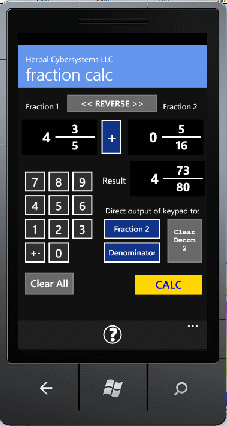
The Fraction Calculator
The process of getting things ready for Microsoft’s Windows Phone 7 Marketplace has Microsoft accepting select apps for advance consideration in the Marketplace. Developers with apps ready to go have been invited to present information about their apps via email. The deadline was today. In fact the deadline was at noon, and I missed it! Yikes. For some reason I thought the deadline was the end of the day, but I clearly didn’t read the notification closely enough. Oh, well.
The thing is, I rather suspect that there were some very sophisticated apps waiting to be submitted, and I can content myself with the assurance that my apps probably wouldn’t have been up to these standards. Anyone for sour grapes?
But still, I sent the email to the requisite destination in the hope that perhaps I might be granted some kind of forebearance. I’m actually going to submit three apps. The first of them (not the first to be started, but the first to be fully completed) is my Coin Tosser app.
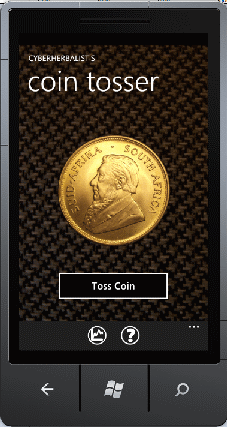
The Coin Tosser
Apparently since the release of the RTW version of the Windows Phone 7 development tools there is some odd thing showing up in the page. It looks like some kind of numeric thing, and it appears on the right side along the top right edge. Here’s a screen shot:
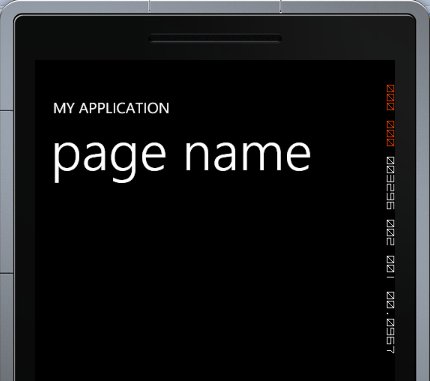
What are those odd figures on the right?
It is not static, either. When something changes in the app (like a button is pressed), this item changes its appearance, as if it were changing its value. The reason I think this is a post-RTW issue is that in apps that I orginally created using the Beta release it doesn’t appear.
I am rather mystified by this, and wonder if it’s something that might find its way into the finished app.
UPDATE: I posted this as a question on the Windows Phone 7 developer forum, and got an answer in very short order. It turns out that the RTW tools automatically turn on the frame rate counter by default. This is a development tool which is supposed to help developers keep tabs on the efficiency of your app. This is nice; too bad I didn’t know it already.
Jeff Wilcox’s blog covers this subject HERE. Thanks to Mick N — Trees for pointing out Jeff’s post.
Yes, there’s been nothing on this blog for literally months. Had you noticed? I didn’t, not really.
And it wasn’t as if there was nothing happening on this end of the keyboard. I have been developing the app that I announced some time back. It has not gone quickly, but most of the blame is on me. I picked a very data-centric model, and then had to develop all the data! It’s a conversion utility, and it converts between three different systems, and several different dimensions.
By “dimensions” I mean things like Mass, Length, Time, Temperature, Velocity, and Volume. Do you want to know how many kilometers per hour there are in five feet per second. My app can tell you. I don’t know if you need that particular conversion, but maybe someone does. It can do it. I call my app:
Converter Plus
Yes, very boring title, but it’s not a game darnit, so boring isn’t a liability. You might wonder why the word “Plus” is in there. And if you do, there’s a reason for it. The app also does some fraction conversion and calculation. You know, what fraction corresponds to 15.7843? Or what decimal corresponds to 2 7/19?
And if you happen to want to actually perform fraction arithmetic, well, my app can do that, too. It can add, subtract, multiply and divide two fractions! But, “Why,” you ask, “would I need a fraction calculator in a conversion utility?” The answer is simple.
When it comes to construction and some other activities, American length measurements, in particular, use fractions. In the USA pretty much all our rulers, yardsticks, and tape measures are delimited in fractions of an inch. In particular, even fractions: One-half; one-quarter; one-quarter and so on down to one-sixteenth. Occasionally you might find one that goes down to one-thirty-second. If you have a blueprint or other kind of plan that indicates that something is 12 1/8 inches long, and you’re going to lay 25 of them end-to-end, how long will the resultant length be. Simply multiply 12 1/8 * 25. Piece of cake. However, while in our schools fraction arithmetic is definitely covered, most pupils come away from it hoping to heck they never actually have to do it in the real world because it is seen as quite complicated. Thus, faced with such a problem in real life, it can be quite a task to get it right. And the attempt will probably fail the first few tiimes. But with Converter Plus, it’s a snap!
I’ll be posting more about it soon. Stay tuned (or subscribe to my RSS feed!).
My Conversion app for Windows Phone 7 is going to have a couple of components for fraction arithmetic — it’s a “conversion”, with one panel converting back and forth between a decimal and a fraction (and vice versa). You know, what kind of fraction does 1.687 form?
If you’re wondering what use that could be, consider what if you have a decimal value for a measurement you want to translate to a length of a board you need to cut off? Not many tape measures are divided off in in decimal equivalents (at least in the United States). So ConversionPlus will find the exact fraction, or if you prefer, the nearest common fraction (like nearest 1/2, 1/4, 1/8, 1/16 or 1/32) — or, given a fraction, what the decimal equivalent.
The other component is out-and-out fraction arithmetic. You want to know what the sum of 32/7 and 23/4 is? Bingo.
Well, that’s all good and well, and I can display the decimal value in a textbox-like component, in calculator-style:

But what do you do about the Fraction? My initial foray was this:

But this SUCKS. Even if it works, kind of. What I settled on was taking the three items (whole, numerator, and denominator) and creating a single control out of them (using an image of a fraction bar):

Now, isn’t that much nicer?
I am still chugging away at my Conversion app. I even have a working title for it: ConverterPlus! The “plus” part is the fraction arithmetic functionality. I know how fractions is everyone’s favorite (not), so maybe this will help. Don’t let on to your math teacher than you have this app. It will add, subtract, divide and multiply fractions. It was fun to code, let me tell you. I plan to make a video of it when I get a few minutes.
The word is, Microsoft is starting to put sample devices in the hands of developers! I have put my name in the hat, and I really hope I can get one fairly soon. It would really help my screen real estate planning to actually have a device in my hand. I keep wondering if the buttons in the app are too small, spaced too closely together, and so on. My ZuneHD has a calculator app, and the buttons seem pretty small and close together on that, yet it is still convenient to use, so perhaps I am worried too much!
I was fighting with the WP7 TextBox, trying to make the thing show up nicely when set to IsReadOnly=true, but there didn’t seem to be a way to override the readonly style, which really made the thing hard to read. Reason I need it set to ReadOnly is this: I don’t want the Input Module popping up when the user touches the text box — because for one thing, I don’t want alphabetics and other non-numeric characters in there! I could prevent this with a ReadOnly textbox, but the Beta version of the WP7 OS doesn’t have a ReadOnly style that is good enough, display-wise. The CTP version was barely workable, but not the Beta. So I’ve compromised: tossed out the TextBox and created my own control.
The control I created is a combination of the Border and the TextBlock control. And it works very well, so I’m pleased! I’ll be showing this off in my next YouTube post. Maybe in a couple of days.
More work yet to do!
I’ve also now come up with about five or six new ideas for apps! I hope I have enough time to build a few of them before WP7 goes into general release.
A post or two ago I mentioned that I had put together a “first app”, and it seemed like a good idea to show it off a bit. It’s more along the line of a demo (although parts of it will probably be recycled to work with my “Real” app, when things get that far). I’ve created a combination code-review and demo video of the project, just in case anyone might be interested. It is now up on YouTube! Here is the link: Calc Demo.
It’s a “Four-Banger Calculator”, something that Microsoft will probably provide as part of Windows Phone 7 — except Microsoft’s will probably be able to be used as a scientific calculator, which this one is not.
I haven’t yet written anything about what I am working on with respect to Windows Phone 7. My first thought on the matter was that maybe I shouldn’t say anything, because it’s supposed to be a for-profit product and handing out information would serve to give my competitors information to help them compete against me. My second thought was to laugh out loud at such presumption! So far hardly anyone has read this blog — thank gooodness WordPress provides statistics or I wouldn’t know this — so I’m writing for my own sake, at least so far. By the time any putative competitors read this blog, it will be way too late for them. I suppose, anyway. Well, it really doesn’t matter at all, in the end, because what I’m working on has in fact already been done for Windows Mobile, Palm, and iPhone anyway. If I can think of it, of course someone else can, and has! Heck, there’s probably three other development outfits developing what I’m developing. So, what am I doing?
This is What I’m Doing
When I initially decided to learn WP7 in order to develop a useful and hopefully popular app for the new system, I was at a loss for what kind of app to write. I have a co-worker at my day job who has an iPhone and he showed me a few of them. The most impressive one (to me, at least), was an app that makes an iPhone into a level — you know, the tool one uses to make sure what you’re building is level, or 90o upright? This quite exceeded my imagination at the time. I thought that maybe I could write a level app, but when I checked on how crowded that particular field was, I found that everyone and his or her brother had built level apps for the iPhone. Go ahead, check Google or Bing, you’ll find lots of them. And Stanley, the toolmaker, has even produced a level app for the iPhone. I think that if I were to produce a level app for WP7 it would only be for the purpose of learning how to use the phone’s accelerometer.
I suppose one could use a phone as a hammer, too, but this wouldn’t require an app! And you’d need a new phone afterwards, too. A trifle expensive.
Kidding aside, I finally hit on something useful, and something that doesn’t necessarily have a big firm, like Stanley, that would be a natural force majeure to compete with. Some developer whose blog I follow (sorry, don’t remember who it was), said that he was hoping someone would develop a conversion app for the new system. BINGO! This actually corresponded nicely with a bit of fascination on my part, since I have always been greatly interested in the huge range of measuring systems that humans have produced over the millenia. Remember the Bibical measurement of Noah’s Ark? How many cubits long was it, now? And I remember Bill Cosby’s comedy routine based on Noah’s Ark, “Noah: Right!”
God: Get some wood, build it 300 cubits by 80 cubits by 40 cubits…
Noah: Right! Uh, what’s a cubit?
So, what is a cubit, more to the point, how many inches is a cubit?
Well, maybe knowing how many inches there are in a cubit isn’t all that useful (there’s no single cubit, anyway, it was a common measure in ancient days, and every culture had its own version, one size definitely didn’t fit all). But for those who must deal with different measurement systems, being able to tell that 1 liter is equal to 0.264 gallons might be helpful. Even more valuable might be that 1 acre-foot is equal to 1,233,481.84 liters. Depending upon who you are and what you do. So that’s what I’m doing, building a measurement conversion app.
Now you can clearly get this information from Google or Bing, with only a little bit of setup (like, if you ask the question correctly). But if you have a need to get this kind of thing at any time and fairly frequently, then a phone app would be more convenient. And that’s what I’m building!
I feel sometimes like I am trying to put five US quarts into a US gallon container — difficult, since a US gallon only has a 4 quart capacity!
While learning development on Windows Phone 7 — and I’ve built a calculator app by way of experimenting with it — I’m also working on coming up with a company to use to market the eventual app I’ll be building, AND getting a podcast started up as well. I’m trying to be a one-man development, marketing and business management shop! I can handle the development (been doing this kind of thing for years), but the marketing and business management are another matter entirely.
Maybe I better modify that analogy to something like “trying to put a gallon into a pint container.”
This Week in Windows Phone
Taking my inspiration from Leo Laporte’s “This Week in Tech” or TWiT, along with Jason Calacanis’ “This Week In…”, and with special inspiration from Gary Vaynerchuck and his “Crush It!” book (and concept), I’m trying mightily to launch a podcast which I’ve named This Week in Windows Phone. I’ve got the domain registered (actually, two domains), both a Twitter and a YouTube account, and heaven help me, a Facebook account as well. All because of GaryVee’s “Crush It!” Well, so far, the only thing I’m crushing is my TIME. As in “not enough time in the day”! Or night. I’ve found myself getting up in the wee hours and making wee little adjustments to my software, instead of making wee little adjustments in my sleeping position. Well, it’s fun, in a way.
Where is all this stuff?
Well, there’s not much there, yet, but eventually there will be something. Here’s the list:
I’ve been trying to come up with a usable way to record the Podcast. I have tried using my old Kodak camera’s movie recording feature, but it produces only marginal video (and audio), and outputs .MOV files, which I have not yet been able to find a free converter for, yet. I’m also uncertain if I want to show my face! An audio-only solution presents itself, Audacity, but I’ve been finding it hard to work with so far. Gosh, what a complainer!
Of course, it completely remains to be seen whether I can produce a podcast that anyone wants to listen to… of course, I myself find my conversation to be fascinating, so there’s gotta be someone, somewhere, who would listen to it. Right? I mean, my mom is no longer with us, so an “it goes without saying”, ready-made audience does not exist. I know darned well that my wife will not be interested in listening to my technological rantings!

